






Text-to-BIM
Text to BIM: generate the building, not just the picture
Write what you want to build and BIM Harness returns a real BIM model: storeys, structure, openings, rooms, façade, roof and fourteen MEP systems, exported as open IFC4X3. The AI does not draw geometry - it writes a building program that our own parametric kernel executes and checks, so the result is a model you keep editing, not an image you regenerate.
- A hospital of 23,321 elements from one brief, in about 13 minutes
- 4,004 MEP components and 186 rooms in that same model
- Clash checking runs inside generation, not after it
- Open IFC4X3 export at any time, no locks
BIM Harness
- Written brief
- AI writes a building program
- Parametric kernel builds and checks it
- Architecture, structure, MEP
- Coordination and named checks
- IFC4X3, drawings, schedules
Every step produces something you can inspect and edit.
What is text-to-BIM?
Text-to-BIM is the generation of a structured, editable BIM model - storeys, walls, rooms, structure and services as typed elements - from a written description. In BIM Harness the AI writes a building program against a parametric kernel, and the kernel builds the model and exports it as IFC4X3.
The phrase gets used for three different things. Some tools turn a prompt into a rendered image. Some turn it into a mesh - a 3D shape with no idea which surface is a wall and which is a slab. A third group drives established desktop BIM tools by script or by clicking through their interface. Only the last kind of output behaves like a building: you can schedule it, cut sections through it, hand it to a structural engineer.
BIM Harness belongs to that last group but takes a different route. Instead of steering someone else’s CAD, the AI writes code in the Harness building dialect - more than a hundred verbs such as api.wall, api.space, api.stair, api.duct and api.autoServices - and that code runs on a kernel we wrote from scratch. The academic research on text-to-BIM follows the same principle: a language model writing code against a BIM API. Harness is the production version of that idea, with the checker, the MEP resolvers and the IFC export around it.
One brief, followed all the way to IFC
The brief below is the one used on the product page: “L-shaped hospital, five storeys, four operating theatres, inpatient wards, three bed lifts, full MEP.” Here is what happens to it.
- 1
1. The brief is split between roles
A team of 30 AI roles picks the brief up. The architect role holds the whole - the L-shaped layout, the storeys, the circulation cores. Structure, HVAC, plumbing, electrical and fire roles each write into their own module instead of one prompt trying to do everything.
- 2
2. The AI writes a building program
Each role produces a script: storeys, floor assemblies, walls, rooms as IFC spaces, doors bound to walls, stairs, lifts, grids and columns, ducts, pipes, cable trays, riser shafts and plant rooms. The model asks for the signatures of the verbs it needs instead of reading a giant prompt.
- 3
3. Trial build on the kernel
The script first runs as a trial: the kernel builds it and checks it, nothing is committed. If a verb cannot be satisfied, the kernel refuses with a readable message and the AI edits its own script with targeted changes rather than rewriting everything.
- 4
4. Architecture, structure and MEP
The live build produces 186 rooms by typology, columns on grids, slabs, stairs and lift cores, and fourteen MEP systems with mains in the ceiling void, shafts, risers and penetrations cut into the structure.
- 5
5. Coordination and checks
Clash checking is part of generation. Hard clashes are measured analytically and services are rerouted automatically. Named findings such as door.obstructed or stair.throughFabric go back to the roles as a repair plan for the next round.
- 6
6. IFC4X3 out
The result - 23,321 elements, 4,004 of them MEP components - is exported deterministically as IFC4X3, with plans and sections to PDF, DWG and DXF and a quantity take-off to XLSX.
What the AI actually writes
This is a real snippet in the Harness building dialect - a fixture tested against the kernel. It is a small house, not the hospital, so it fits on a screen. The hospital program is the same kind of code, only much longer.
const ground = api.ensureStorey('Ground floor', 0);
const W = 12, D = 8, H = 3.4;
const outline = [[0,0],[W,0],[W,D],[0,D]];
api.floorAssembly({ slabOutline: outline, wallOutline: outline, storey: ground });
const south = api.wall({ start: [0,0], end: [W,0], storey: ground, height: H });
api.wall({ start: [W,0], end: [W,D], storey: ground, height: H });
api.wall({ start: [W,D], end: [0,D], storey: ground, height: H });
api.wall({ start: [0,D], end: [0,0], storey: ground, height: H });
const partition = api.wall({ start: [W/2,0], end: [W/2,D], storey: ground, height: H, thickness: 0.15 });
api.space({ outline: [[0,0],[W/2,0],[W/2,D],[0,D]], storey: ground, height: H, name: 'Hall', type: 'hall' });
api.space({ outline: [[W/2,0],[W,0],[W,D],[W/2,D]], storey: ground, height: H, name: 'Study', type: 'office' });
api.door({ wall: partition.id, offset: D/2, width: 0.9 });
api.door({ wall: south.id, offset: W/4, width: 1.4 });
api.window({ wall: south.id, offset: 3*W/4, width: 1.2, sill: 0.9 });
const roof = api.roofLevels({ wallHeadM: H, spanM: D, pitchDeg: 35, overhangM: 0.5 });
api.roof({ outline, storey: ground, shape: 'gable', pitch: 35, eavesHeight: roof.eavesHeightM, overhang: 0.5, ridgeAxis: 'x' });
api.gable({ start: [0,0], end: [0,D], storey: ground, baseHeight: H, ridgeHeight: roof.ridgeHeightM });
api.gable({ start: [W,0], end: [W,D], storey: ground, baseHeight: H, ridgeHeight: roof.ridgeHeightM });Three things called “text to BIM”
The output decides what you can do next. This is how the common approaches differ.
| Text to image / 3D mesh | AI driving desktop BIM | BIM Harness | |
|---|---|---|---|
| What comes back | Pixels or a triangle mesh | Elements in an existing desktop model | An IFC model built by a parametric kernel |
| Walls, rooms, storeys as entities | No | Yes | Yes |
| MEP systems | No | Usually outside the scope | Fourteen systems, generated with the building |
| Checks during generation | No | Depends on the script | Named checks and clash checking inside generation |
| Iterating | Regenerate and hope | Rerun or edit by hand | Next sentence, or edit by hand in the browser editor |
| Where it runs | Web | Desktop installation and licence | The browser, nothing to install |
For the difference between shapes and buildings see text-to-3D vs text-to-BIM; for the two ways an AI can drive BIM software see Computer Use vs a BIM API.
The reference hospital, in numbers
23,321
BIM elements from a single brief
4,004
MEP components across fourteen systems
186
rooms, laid out by typology
~13 min
from the sentence to the finished model
< 1 min
kernel time for a ~20,000-element hospital, MEP included
4,500+
automated tests guard every release
Almost all of the wall-clock time is the language model thinking. The kernel is the fast, cheap part: in a real run of a family house, building the model in the browser took about 7 seconds and laying the MEP about 6.
Iterate with the next sentence, or edit by hand
A generated model in BIM Harness is not a final answer: you refine it with the next sentence to the AI or by hand in a full parametric editor, and both work on the same model.
“Add a storey.” “Enlarge the south-facing windows.” The AI edits the program it wrote and the model updates; versions sit side by side so you can compare them. A built-in prompt advisor helps you write a better brief before you spend a run on it.
Or skip the AI for a moment and edit directly. The kernel is parametric: a wall knows it is a wall, with a build-up, mitred corners and openings as a relation. Move it and only what hangs on it regenerates. Change a wall type and the model regenerates. Overwrite a number in a schedule and the model changes. The same scripting API the AI uses is available to you in the editor (Studio plan and higher), so whatever the agent can do, so can you.
The AI panel next to the model it built
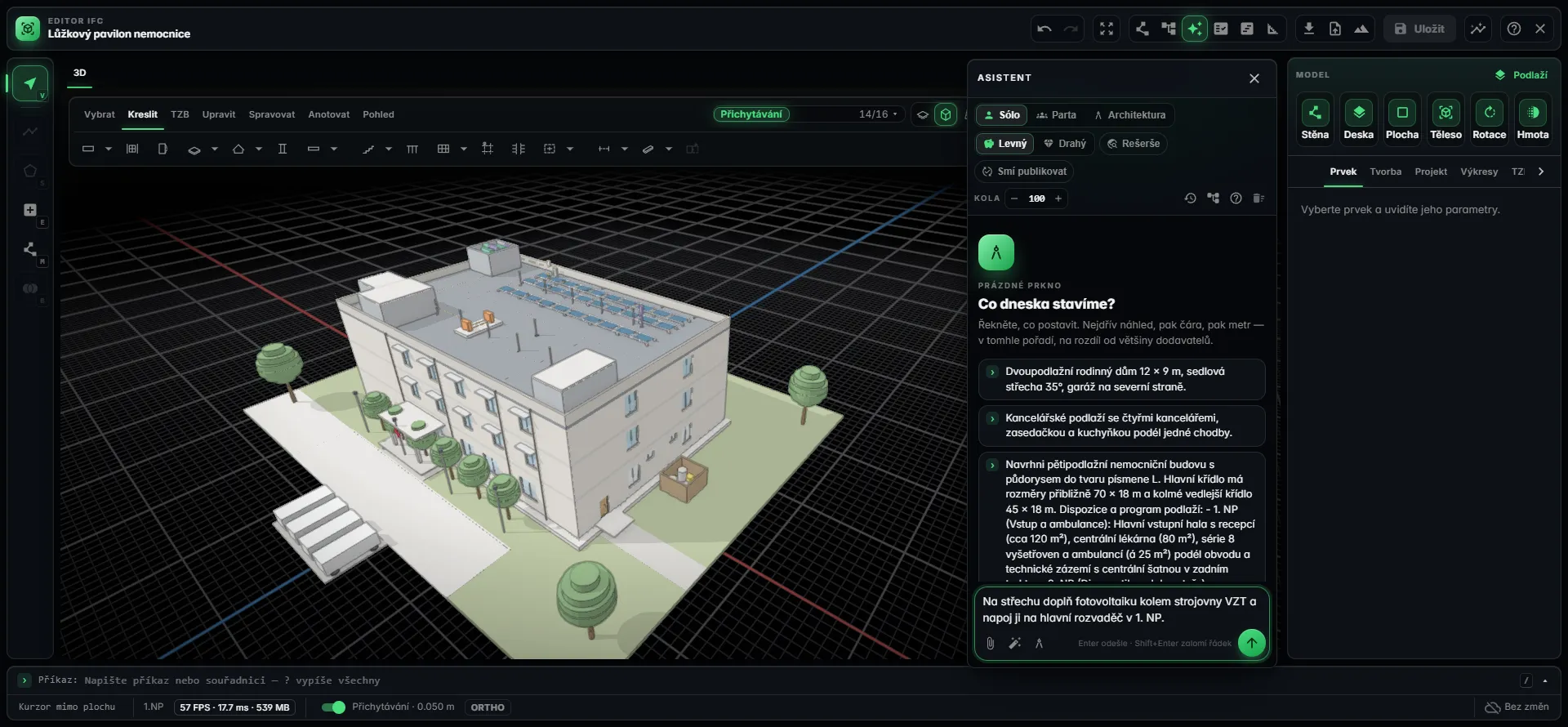
What it builds from one brief today
Rooms are laid out by typology, so the brief for a school and the brief for an office start from different programmes.
Healthcare
Hospitals and clinics, including operating theatres, wards, bed lifts and medical gases to the beds.
Residential
Family houses, villas and apartment buildings, including buildings on slopes.
Hospitality and offices
Hotels and office buildings with circulation cores, curtain walls and full MEP.
Education and culture
Schools and cultural centres, including multi-storey atria.
Retail
Shopping centres and retail parks.
Industrial
Production and logistics halls, precast and frame structures, steel halls.
Heritage
Castles and monuments built from cadastral footprints and the Czech terrain model.
An image generator gives you something to look at. A building program gives you something to work on: every element is a real entity with parameters, a type and a material, and the export is IFC your consultants can open.
An open model, not a walled garden
IFC is the boundary of BIM Harness, not its internals. The model lives in the parametric kernel and is generated deterministically as IFC4X3 when you export it - any time, with no locks. Autodesk tools, Archicad and CDEs pick it up. In the other direction, Harness imports IFC2X3, IFC4 and IFC4X3 with a measured import coverage of 1.0 on real-world exports, so you can bring an existing project in and continue from it.
The same model produces plans, sections and a permit set with dimensions and annotations to PDF, DWG and DXF; a quantity take-off by material, class and storey to XLSX or CSV; and a 4D schedule with a two-way MS Project exchange. It all runs in the browser.
Frequently asked questions
What is text-to-BIM?
Text-to-BIM means generating a structured BIM model - storeys, walls, rooms, structure and building services as typed elements - from a written description, rather than an image or a mesh. In BIM Harness a language model writes a building program in a dialect of more than a hundred verbs, and a parametric kernel builds, checks and exports it as IFC4X3.
How long does it take to generate a building from text?
It depends on the size of the building. The reference hospital - 23,321 elements, 4,004 of them MEP components, 186 rooms - took about 13 minutes from one brief. Nearly all of that is the language model thinking. The kernel itself builds a hospital of roughly 20,000 elements, MEP included, in under a minute, and a family house in seconds.
Can AI-generated BIM be edited in other BIM software?
Yes, through IFC. BIM Harness exports IFC4X3 at any time, with no locks, and the export is generated deterministically from the parametric model rather than dumped as triangles. Autodesk tools, Archicad and common CDEs pick it up. Walls, slabs, rooms and MEP components arrive as IFC entities with typed properties, and the model survives export and re-import into Harness without loss.
Is the output just a massing model?
No. Massing generators stop at the envelope and the layout. A BIM Harness model carries storeys, structure on grids, openings, rooms as IFC spaces, façade, roof and fourteen MEP systems with shafts, risers and penetrations cut into the structure. Reinforcement is generated to Eurocode 2 rules, and plans, sections and schedules come from the same model.
What happens when the AI gets something wrong?
The kernel checks the program before it is committed. A verb that cannot be satisfied is refused with a readable message, and the checker returns named findings such as clash.hard or door.obstructed. These feed a repair plan and the AI edits its own script. You still review the result, and you can correct anything with the next sentence or by hand.
Do I need to install anything?
No. The whole editor, the AI assistant and the photorealistic renderer run in the browser. Generated models open on your own machine, and you can export IFC, PDF, DWG, DXF and XLSX from there. There is no desktop installation and no dependency on a third-party CAD licence, because the kernel underneath was written from scratch.
Write the brief. Get the model.
Start from one sentence, keep the IFC, refine it with the next sentence or by hand - in the browser.