






Parametric BIM · Own kernel
Parametric BIM: change a parameter, regenerate only what depends on it
BIM Harness stands on a parametric kernel written from scratch, not a plugin on someone else’s CAD. Elements know what they are and what they depend on, so a change regenerates exactly the elements that hang on it - and an AI can change a building by editing its program instead of re-modelling it.
- Move a wall and only its dependents regenerate
- Families, types, grids, datums and unit-checked formulas
- A ~20,000-element hospital, MEP included, builds in under a minute
- Schedules work both ways: edit the table, the model changes
Change without a dependency graph
- Move a wall
- Fix openings by hand
- Fix rooms and slabs
- Redraw plans and schedules
Every dependent is the modeller’s job
Parametric kernel
- Move a wall
- Graph finds the dependents
- Only those regenerate
- Drawings and schedules follow
Dependents are the kernel’s job
What parametric BIM means
Parametric BIM is building modelling in which elements are defined by parameters and relations rather than fixed geometry. When a parameter changes, the model regenerates the elements that depend on it, so geometry, drawings and schedules stay consistent without being redrawn.
In a parametric model a wall is not a box with some properties attached. It knows it is a wall: it has a build-up of layers, mitred corners where it meets other walls, openings that are relations to the doors and windows it hosts, and a place in a dependency graph. Change its type and the model regenerates; move it and the openings and joins that depend on it follow.
This is the layer established desktop BIM tools stand on. BIM Harness has its own implementation of it, written from scratch and running in the browser - which is what makes it possible to put an AI on top without inheriting another product’s ceiling or licence.
What happens when a parameter changes
Take one edit - moving an external wall half a metre - and follow it through the kernel.
- 1
The edit lands on the parameter
The wall’s start and end points change. Nothing else is touched directly.
- 2
The dependency graph finds the dependents
Doors and windows hosted by the wall, the joins at its corners, the walls it mitres with - whatever hangs on it.
- 3
Only the dependents regenerate
Everything that does not hang on that wall stays as it was. That is why an edit is instant even on a large model.
- 4
Views and schedules follow
Plans and sections are generated from geometry, so they redraw from the new model; quantities recalculate live.
The parametric object model
The pieces a BIM manager expects from a parametric platform - in a browser, on an own kernel.
Families with parameters
Families define a kind of element with parameters; types fix a set of values. Change a type and every instance of it regenerates.
Unit-checked formulas
Parameters can be driven by formulas, and the formulas are unit-checked - a length cannot silently be set from an area.
Grids and datum elements
Structural grids, columns on intersections and datum elements give the model references that other elements follow.
Openings as relations
A door or window belongs to its host wall. It moves with the wall and voids it, instead of being a separate solid placed in the same spot.
Drawings from geometry
Plans, sections and a permit set with dimensions, annotations and hidden lines are generated from the model and exported to PDF, DWG and DXF.
Schedules both ways
Schedules read the model, and you can write back: overwrite a number in the table and the model changes.
Regeneration at building scale
< 60 s
to build a ~20,000-element hospital, MEP included, on the kernel
86,006
elements in an opera house that turns smoothly in the browser
~7 s
to build a family house from its script in the browser
4,500+
automated tests guard every release
Kernel time only; AI time is extra. Rendering uses streamed 3D tiles, which is why very large models stay responsive in a browser.
The AI edits the program, not the mesh
On a parametric kernel an AI does not have to re-model a building to change it. It edits the program that describes the building - a parameter, a verb, a relation - and the kernel regenerates what depends on the change.
Generative tools that output meshes or images have one way to respond to "make it one storey taller": generate again and hope the rest survives. A parametric model has a better answer. The building exists as intent plus parameters - a script in the Harness building dialect - so a change is a targeted edit of that script, and the kernel does the regeneration.
This is also why the model stays a model after the AI is done with it. You can move a wall by hand, retype the windows, overwrite a quantity in a schedule or add a storey with the next sentence. All of it lands on the same parametric object model, and the IFC4X3 export is generated from it deterministically.
Intent plus parameters, in code
A fragment of a real script in the building dialect. Width, depth and storey height are parameters; walls, the roof and its heights are derived from them.
const W = 12, D = 8, H = 3.4;
const outline = [[0,0],[W,0],[W,D],[0,D]];
api.floorAssembly({ slabOutline: outline, wallOutline: outline, storey: ground });
const south = api.wall({ start: [0,0], end: [W,0], storey: ground, height: H });
api.wall({ start: [W,0], end: [W,D], storey: ground, height: H });
api.wall({ start: [W,D], end: [0,D], storey: ground, height: H });
api.wall({ start: [0,D], end: [0,0], storey: ground, height: H });
const partition = api.wall({ start: [W/2,0], end: [W/2,D], storey: ground, height: H, thickness: 0.15 });
api.space({ outline: [[0,0],[W/2,0],[W/2,D],[0,D]], storey: ground, height: H, name: 'Hall', type: 'hall' });
api.space({ outline: [[W/2,0],[W,0],[W,D],[W/2,D]], storey: ground, height: H, name: 'Study', type: 'office' });
api.door({ wall: partition.id, offset: D/2, width: 0.9 });
api.door({ wall: south.id, offset: W/4, width: 1.4 });
api.window({ wall: south.id, offset: 3*W/4, width: 1.2, sill: 0.9 });
const roof = api.roofLevels({ wallHeadM: H, spanM: D, pitchDeg: 35, overhangM: 0.5 });Three ways to change a generated building
| Mesh or image generator | Static BIM export | Parametric kernel (BIM Harness) | |
|---|---|---|---|
| What the model is | Triangles or pixels | Elements with fixed geometry | Elements with parameters and relations in a dependency graph |
| Change "one storey taller" | Generate again | Edit elements by hand | Edit the program; the kernel regenerates dependents |
| Openings when a wall moves | Not a concept | Stay where they were placed | Move with their host wall |
| Drawings and schedules | None | Redrawn or re-exported | Generated from geometry; schedules editable both ways |
| Open exchange | Mesh formats | IFC as exported | IFC4X3 generated deterministically from the model |
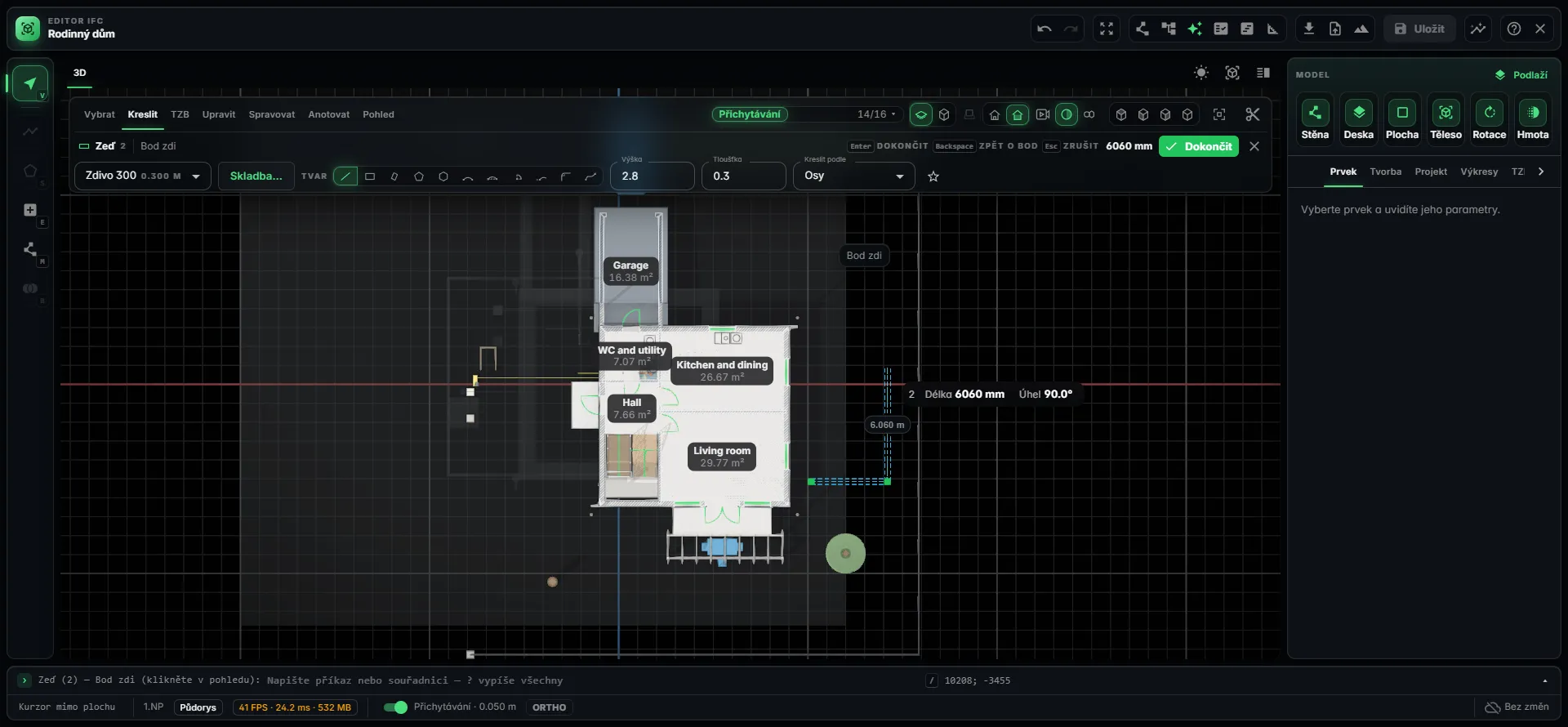
Parametric editing in the browser
Frequently asked questions
What is parametric BIM?
Parametric BIM is building modelling where elements are defined by parameters and relations instead of fixed geometry. A wall has a type, a build-up, joins and hosted openings; when a parameter changes, the elements that depend on it regenerate. Drawings and schedules are derived from the model, so they stay consistent without being redrawn by hand.
What happens in BIM Harness when I move a wall?
The kernel follows the wall’s dependencies and regenerates only what hangs on it, such as the doors and windows it hosts, and the joins with neighbouring walls. Everything else stays untouched, which is why the edit is instant. Plans and sections are generated from geometry, and quantities recalculate live.
Is BIM Harness a plugin for another CAD platform?
No. BIM Harness runs on its own parametric kernel, written from scratch, in the browser. It does not depend on a third-party CAD licence. Interoperability with established desktop BIM tools goes through open IFC: import of IFC2X3, IFC4 and IFC4X3 with measured coverage of 1.0, and export to IFC4X3.
Does it support families, types and formulas?
Yes. The kernel has families with parameters, types, structural grids and datum elements, and parameters can be driven by unit-checked formulas. Changing a type regenerates every instance of it. Schedules work both ways: you can overwrite a number in a table and the model changes to match.
How fast is regeneration on a large model?
A whole hospital of roughly 20,000 elements, MEP included, builds on the kernel in under a minute; a family house takes about seven seconds in the browser. That is kernel time - AI time is extra. Rendering uses streamed 3D tiles, so an opera house of 86,006 elements turns smoothly in a browser.
Why does a parametric kernel matter for AI design?
Because the AI can change a building by editing its program instead of re-modelling it. The building exists as intent plus parameters in a script; the AI makes a targeted edit and the kernel regenerates what depends on it. The result stays an editable model you can keep working on by hand, by script or with the next sentence.
Change a parameter and watch the model follow
Open a gallery model in the browser, cut sections, walk through it - then get access and change one yourself.