






Agentic BIM, from the inside
How AI BIM agents work: the loop behind a generated building
A BIM agent is not one prompt that returns a building. In BIM Harness a crew of thirty roles writes a building program, builds it as a trial, reads named findings from a checker, plans repairs and edits only what is wrong - and hands geometry, MEP layout and clash resolution to a deterministic kernel.
- A team of 30 roles: the architect holds the whole, each discipline writes its own module
- API reference fetched on demand, not pasted as one giant prompt
- Trial build, named findings, repair plan and targeted edits before the live build
- Model-agnostic: which language model answers is one line of configuration
Language model (roles)
- Read the brief
- Fetch verb signatures
- Write the script
- Plan repairs
- Targeted edits
Decides what to build
Kernel and checker
- Trial build
- Named findings
- Live build
- Deterministic MEP resolvers
- IFC model
Decides how it is built, and whether it holds
What an AI BIM agent does
An AI BIM agent is a language model that works in a loop with a BIM engine: it writes changes to a building model, has the engine build and check them, reads the findings and repairs its own work until the model holds.
The category - what AI-native BIM is and why it needs its own kernel - is covered on the AI-native BIM page. This page is about mechanics: what the agent actually does, in which order, and which decisions it is deliberately not allowed to make. It is written for AI and technology teams and for CTOs who want to know what sits behind "the AI builds it".
The short version: the language model decides what the building should be and writes it down as a program. The kernel decides how that becomes geometry, and a checker decides whether the result holds. The loop between them is where the quality comes from.
A crew of thirty roles, not one prompt
A brief for a hospital is too much for one prompt to hold. BIM Harness splits the work the way a design office does, with a registry of thirty roles.
The architect holds the whole
The architect role owns the building as a whole - storeys, layout, rooms by typology, the envelope - and keeps the other roles working on the same building.
Disciplines write their own modules
Structure, HVAC, plumbing, electrical, fire and the other roles each write into their own module of the building program, so each discipline’s work has its own place in the program.
One shared building dialect
Every role writes in the same dialect of more than a hundred verbs - api.wall, api.space, api.duct, api.riserShaft, api.autoServices and so on - executed by the same kernel.
The agent loop, step by step
Each round of work follows the same sequence. Nothing reaches the project until a trial has been built and checked.
- 1
1. Fetch the API reference on demand
The model asks for the signatures of the verbs it needs instead of receiving the whole reference as one giant prompt. It works with exact parameters and keeps its context for the building.
- 2
2. Write the script
The role writes its part of the building as code in the Harness building dialect: storeys, walls, rooms as IFC spaces, openings hosted by wall ids, roofs, stairs, services.
- 3
3. Trial build
The kernel builds and checks the script without committing anything. A family house builds in seconds; the kernel is the fast, cheap part of the loop.
- 4
4. Read named findings
The checker returns machine-readable findings split into author findings (design mistakes the model should fix) and engine findings - for example clash.hard, door.obstructed, stair.throughFabric or room.accessEnvelope.
- 5
5. Plan the repair
Findings feed a repair plan for the next round, so the agent works from a list of concrete problems rather than a vague sense that something is off.
- 6
6. Make targeted edits
The agent reads its own script back and edits the lines concerned instead of rewriting everything. What already works stays as it was.
- 7
7. Live build
The repaired script runs as the live build and becomes the model in the editor.
- 8
8. Deterministic MEP resolvers and the checker
MEP layout and clash resolution are done by deterministic resolvers, not by the language model. Clash checking is part of generation, and services are rerouted automatically until the model has no hard clashes.
What a finding looks like in a real run
In a production run on 21 September 2026 the agent asked the kernel for a gable wall under a roof that did not reach it. The kernel did not guess. It answered: "api.gable: the roof given does not cover this wall ... It was not built." The model rewrote that part of the script and the next build went through.
That is the behaviour an agent needs from its engine. A refusal with a reason is information the model can act on. A silent best effort - a gable built anyway, floating next to the roof - would be an error nobody notices until much later.
Why the language model should not decide where every vertex goes
In BIM Harness the language model decides what to build and the kernel decides how: geometry, roof heights, MEP layout and clash resolution are computed deterministically, so the same script against the same kernel builds the same model.
A language model is good at reading a brief, choosing a layout, naming rooms and deciding which systems a building needs. It is not a reliable calculator of coordinates, and it is not deterministic. Asking it to place every vertex means every number is a chance for a small error, and running it twice gives two slightly different buildings.
So the dialect is designed to keep geometry out of the model’s hands wherever it can. A door is attached to a wall by the wall’s id, not placed at a coordinate the model has to get right. Roof heights come from api.roofLevels; the model does not compute them in its head. Ducts, pipes and trays are laid by resolvers. The language model is not deterministic, but execution is.
Relations and computed values in the script
A contiguous part of a real script tested against the kernel. Doors reference walls; roof heights come from the kernel.
const partition = api.wall({ start: [W/2,0], end: [W/2,D], storey: ground, height: H, thickness: 0.15 });
api.space({ outline: [[0,0],[W/2,0],[W/2,D],[0,D]], storey: ground, height: H, name: 'Hall', type: 'hall' });
api.space({ outline: [[W/2,0],[W,0],[W,D],[W/2,D]], storey: ground, height: H, name: 'Study', type: 'office' });
api.door({ wall: partition.id, offset: D/2, width: 0.9 });
api.door({ wall: south.id, offset: W/4, width: 1.4 });
api.window({ wall: south.id, offset: 3*W/4, width: 1.2, sill: 0.9 });
const roof = api.roofLevels({ wallHeadM: H, spanM: D, pitchDeg: 35, overhangM: 0.5 });
api.roof({ outline, storey: ground, shape: 'gable', pitch: 35, eavesHeight: roof.eavesHeightM, overhang: 0.5, ridgeAxis: 'x' });Where the time goes
~7 s
to build a family house on the kernel in a real production run
~6 s
to lay its MEP
< 1 min
kernel time for a hospital of about 20,000 elements, MEP included
~13 min
from brief to a 23,321-element hospital, AI time included
Nearly all of the wall-clock time is the language model thinking, not the kernel. That is why the loop can afford trial builds.
Model-agnostic by design
The agent runs on more than one language model provider. Which model answers is one line of configuration; the tools, the checker and the thirty roles stay the same. That keeps the quality of the result tied to the engine and the loop, and lets a team move to a better model without rebuilding anything.
It also answers a question every CTO asks about AI products: what happens when models get better? Better AI does not make the BIM engine obsolete. Better AI makes the BIM engine more capable. A stronger model writes better programs and should need fewer repair rounds; the kernel still builds them in seconds, the checker still names what is wrong, and the resolvers still lay the services.
Better AI does not make the BIM engine obsolete. Better AI makes the BIM engine more capable.
The loop, as the user sees it
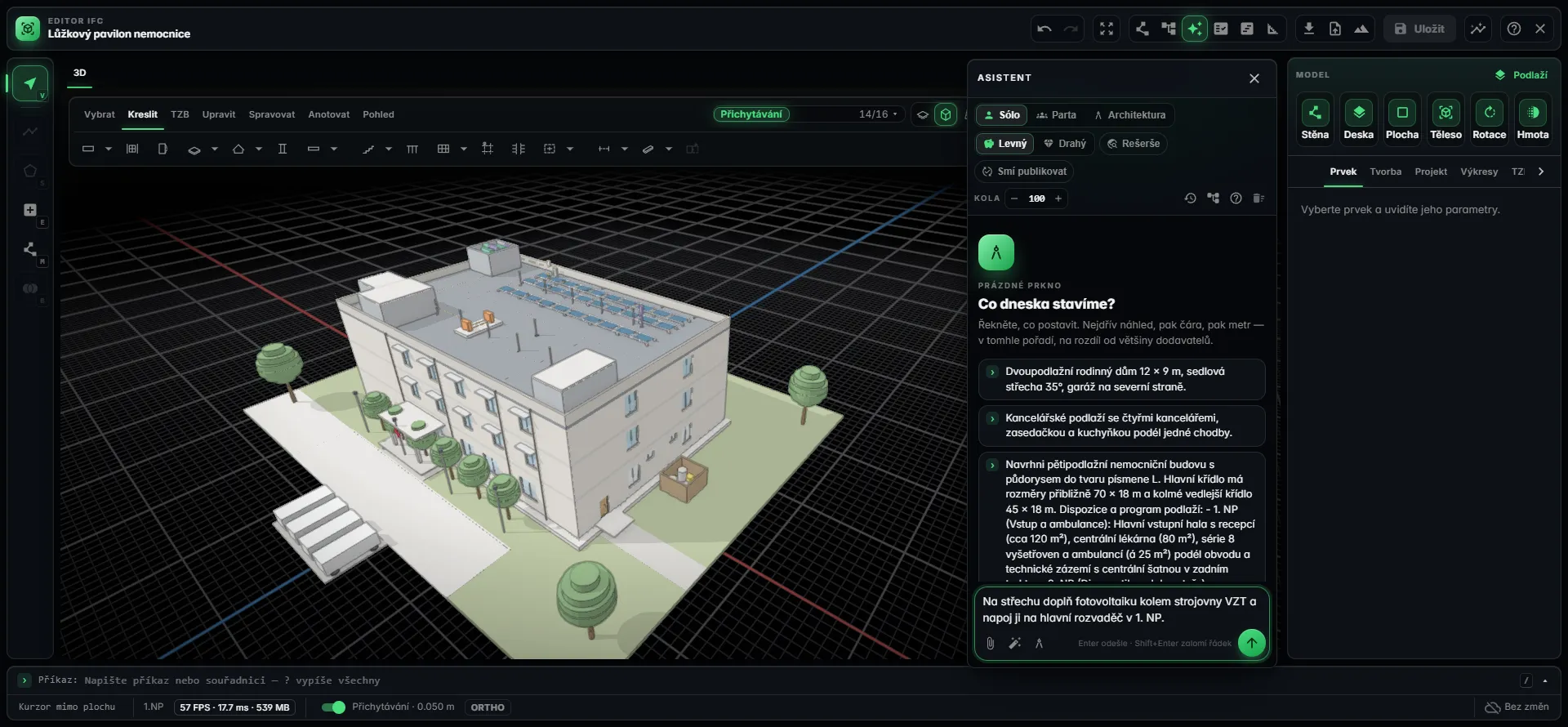
How the loop itself is kept honest
An agent loop is only as trustworthy as what checks it. BIM Harness releases are guarded by more than 4,500 automated tests, measured against a benchmark of 21 reference buildings and exercised in live runs on real briefs.
Frequently asked questions
How do AI agents work with BIM?
In BIM Harness an AI agent works in a loop with a BIM kernel. It fetches the API signatures it needs, writes a building program in a dialect of more than a hundred verbs, runs a trial build, reads named findings from a checker, plans repairs and edits the lines concerned. Only then does the live build run. MEP layout and clash resolution are handled by deterministic resolvers.
What is agentic BIM?
Agentic BIM means AI agents that do not just answer questions about a model but change it: they write to the model, have an engine build and check the result, and repair their own work based on findings. In BIM Harness this is done by a crew of thirty roles writing a building program that a parametric kernel executes, checks and turns into an IFC model.
Why does BIM Harness use thirty roles instead of one AI?
A whole building is too much for one prompt to hold reliably. BIM Harness splits the work the way a design office does: the architect role holds the whole building, while structure, HVAC, plumbing, electrical, fire and other roles each write into their own module. Every role uses the same building dialect and the same kernel, checker and findings.
Why shouldn’t the language model calculate the geometry?
Language models are good at interpreting a brief and deciding what to build, but they are not reliable calculators of coordinates and they are not deterministic. BIM Harness keeps geometry with the kernel: doors are attached to walls by id, roof heights come from api.roofLevels, and MEP is laid by deterministic resolvers. The same script against the same kernel builds the same model.
Which language model does BIM Harness use?
BIM Harness is model-agnostic. The agent runs on more than one language model provider, and which model answers is one line of configuration. The tools, the checker, the named findings and the thirty roles stay the same whichever model is used. A better model writes better building programs; the kernel, checker and resolvers keep doing the building, checking and routing.
What happens when the agent makes a mistake?
The checker returns named, machine-readable findings such as clash.hard, door.obstructed or stair.throughFabric, split into author findings for the model to fix and engine findings. If a verb cannot do what it was asked, the kernel refuses by name and does not build it. Findings feed a repair plan, and the agent makes targeted edits to its script before the live build.
Will better AI models make BIM engines unnecessary?
No. Better AI does not make the BIM engine obsolete; it makes the BIM engine more capable. A stronger model writes better programs that should need fewer repair rounds, but something still has to turn them into consistent parametric objects, check them, lay services deterministically and export IFC. In BIM Harness that is the kernel, which builds a family house in about seven seconds.
See the loop run on your own brief
Give BIM Harness a building in your own words and watch thirty roles write it, the kernel build it and the checker name what needs fixing - then open the IFC model in your browser.