






BIM scripting · Programmatic BIM
BIM scripting in a building dialect, not a geometry API
In BIM Harness a building is written as a program: a door is hosted by a wall id, a room is an IFC space, roof heights are computed by the kernel. The AI agent builds every model through this dialect - and the same Scripting API is open to you in the editor.
- More than a hundred domain verbs, from api.wall to api.autoServices
- Trial build first: the kernel builds and checks, nothing is committed
- Named, machine-readable findings such as clash.hard and door.obstructed
- Same script, same kernel, same model - deterministic execution
General CAD/BIM API
- Compute coordinates
- Create solids and placements
- Attach properties
- Export, open, inspect
The caller carries the building knowledge
Harness dialect
- Write intent: storeys, walls, spaces, openings
- Trial build with named findings
- Targeted edit of the script
- Live build → IFC4X3
The kernel carries the building knowledge
What BIM scripting is
BIM scripting is creating or changing a building information model with code instead of mouse clicks. In BIM Harness the script is written in a building dialect: calls such as api.wall, api.space and api.door that name building elements and their relations, which a parametric kernel turns into a checked model.
Most programmatic BIM today means driving a desktop application or an IFC library from Python: you compute points, create entities, set placements and attach property sets. That is powerful, and it is also low-level. The script has to know where every opening sits in world coordinates, which entity hosts which, and how high a roof ridge ends up for a given pitch.
The Harness dialect moves that knowledge into the kernel. The script says what the building is - a storey, a wall between two points, a hall of this outline, a door in that wall - and the kernel works out geometry, joins, openings and IFC entities. The result is a script that reads like a description of the building rather than a sequence of geometry operations.
What the dialect looks like
A complete small building: one storey, a floor, four walls, a partition, two rooms, two doors, a window and a gabled roof. This fixture is run against the kernel in the test suite.
const ground = api.ensureStorey('Ground floor', 0);
const W = 12, D = 8, H = 3.4;
const outline = [[0,0],[W,0],[W,D],[0,D]];
api.floorAssembly({ slabOutline: outline, wallOutline: outline, storey: ground });
const south = api.wall({ start: [0,0], end: [W,0], storey: ground, height: H });
api.wall({ start: [W,0], end: [W,D], storey: ground, height: H });
api.wall({ start: [W,D], end: [0,D], storey: ground, height: H });
api.wall({ start: [0,D], end: [0,0], storey: ground, height: H });
const partition = api.wall({ start: [W/2,0], end: [W/2,D], storey: ground, height: H, thickness: 0.15 });
api.space({ outline: [[0,0],[W/2,0],[W/2,D],[0,D]], storey: ground, height: H, name: 'Hall', type: 'hall' });
api.space({ outline: [[W/2,0],[W,0],[W,D],[W/2,D]], storey: ground, height: H, name: 'Study', type: 'office' });
api.door({ wall: partition.id, offset: D/2, width: 0.9 });
api.door({ wall: south.id, offset: W/4, width: 1.4 });
api.window({ wall: south.id, offset: 3*W/4, width: 1.2, sill: 0.9 });
const roof = api.roofLevels({ wallHeadM: H, spanM: D, pitchDeg: 35, overhangM: 0.5 });
api.roof({ outline, storey: ground, shape: 'gable', pitch: 35, eavesHeight: roof.eavesHeightM, overhang: 0.5, ridgeAxis: 'x' });
api.gable({ start: [0,0], end: [0,D], storey: ground, baseHeight: H, ridgeHeight: roof.ridgeHeightM });
api.gable({ start: [W,0], end: [W,D], storey: ground, baseHeight: H, ridgeHeight: roof.ridgeHeightM });Six design choices behind the dialect
The dialect was shaped by what goes wrong when a language model - or a tired person - writes a building. Each choice removes a class of mistakes.
Domain verbs, not geometry primitives
api.wall, api.stair, api.curtainWall, api.riserShaft, api.plantRoom: more than a hundred verbs that name building elements. The kernel builds layered walls, mitred corners and openings; the script never assembles a solid.
Relations by id
A door is hosted by partition.id at an offset along that wall - a relation, not a coordinate. Move or lengthen the wall and the door stays in it, because it was never a free-floating box.
A room is an IFC space
api.space creates a real space with a name and a type. Without it nothing can be ventilated, measured or named, so the dialect makes rooms first-class instead of leaving them implied by walls.
The kernel does the arithmetic
api.roofLevels returns eaves and ridge heights for a wall head, span, pitch and overhang. The script passes those numbers on to api.roof and api.gable instead of computing them itself.
Storey-local coordinates
Every storey shares the same plan coordinates, and heights are measured from the storey. A script can repeat a plan on the next floor without adding elevations by hand - a mistake that otherwise puts a wall one floor up.
Deterministic execution
The same script against the same kernel builds the same model. MEP layout and clash resolution are done by deterministic resolvers, so a script is a reproducible artefact you can diff, review and rerun.
Trial build, findings, targeted edit, live build
A script is not run blind. The loop below is how the AI agent works, and it is the same loop available to a person in the editor.
- 1
Trial build
The kernel builds the script and checks it, but nothing is committed to the model. A broken idea costs seconds and leaves the project untouched.
- 2
Read the findings
The checker returns named findings split into author findings - design mistakes to fix - and engine findings. Examples: clash.hard, door.obstructed, stair.throughFabric, room.accessEnvelope.
- 3
Edit the script, not everything
The script is read back and changed with targeted edits: one gable, one door offset. Findings feed a repair plan for the next round instead of a full rewrite.
- 4
Live build
Once the trial is clean enough, the same script runs as the live build. The model becomes an IFC4X3-exportable project you keep editing by hand or by script.
api.gable: the roof given does not cover this wall … It was not built.
General CAD/BIM API via Python vs the Harness dialect
Both are legitimate ways to build models from code. They sit at different levels of abstraction, which changes who has to know what.
| General CAD/BIM API via Python | Harness building dialect | |
|---|---|---|
| Abstraction level | Entities, placements, geometry representations, property sets | Building elements and relations: storey, wall, space, door, roof, duct, riser shaft |
| What the caller must know | Coordinate systems, hosting rules, how openings are voided, schema details | The building: dimensions, rooms, which wall a door belongs to |
| Derived values | Computed by the script (roof heights, opening positions) | Computed by the kernel, e.g. api.roofLevels for eaves and ridge |
| Validation | Usually after export, in a separate checker or by eye | Trial build with a checker before anything is committed |
| What a failure looks like | An exception, or a model that exports but is wrong | A named finding or an explicit refusal ("It was not built") |
| Changing a design | Rerun the script or edit geometry and relations by hand | Targeted edit of the script; the kernel regenerates what depends on it |
| Output | Whatever the script wrote | A parametric model; IFC4X3 generated deterministically at export |
A general API gives maximum freedom and is the right tool for many jobs. The dialect trades some of that freedom for a script that a language model can write reliably and a person can read at a glance.
Whatever the AI can do, so can you
The Scripting API in BIM Harness is the same API the AI agent builds models with. Anything the agent can do to a model through the dialect, a person can do by script in the editor.
There is no second, reduced surface for humans. When the AI lays out a hospital, it writes calls such as api.grid, api.column, api.slab, api.stairWell, api.lift, api.duct, api.pipe, api.cableTray and api.autoServices. A computational designer can write the same calls for batch edits - retyping every window on a facade, adding a storey, placing columns on a new grid.
The API reference is served on demand: the agent asks for the signatures of the verbs it needs rather than receiving a giant prompt, and a person gets the same signatures in the editor. Because the agent is model-agnostic - which language model answers is one line of configuration - the dialect is the stable part. Better models make the engine more capable; they do not replace it.
What the kernel under the scripts does
100+
verbs in the building dialect
~7 s
to build a family house from its script in the browser
< 60 s
to build a ~20,000-element hospital, MEP included, on the kernel
4,500+
automated tests guard every release
In a real production run of a family house the kernel built the model in about 7 seconds and laid the MEP in about 6. Nearly all wall-clock time is the language model thinking: the kernel is the fast, cheap part.
The agent writes the script; you see the model
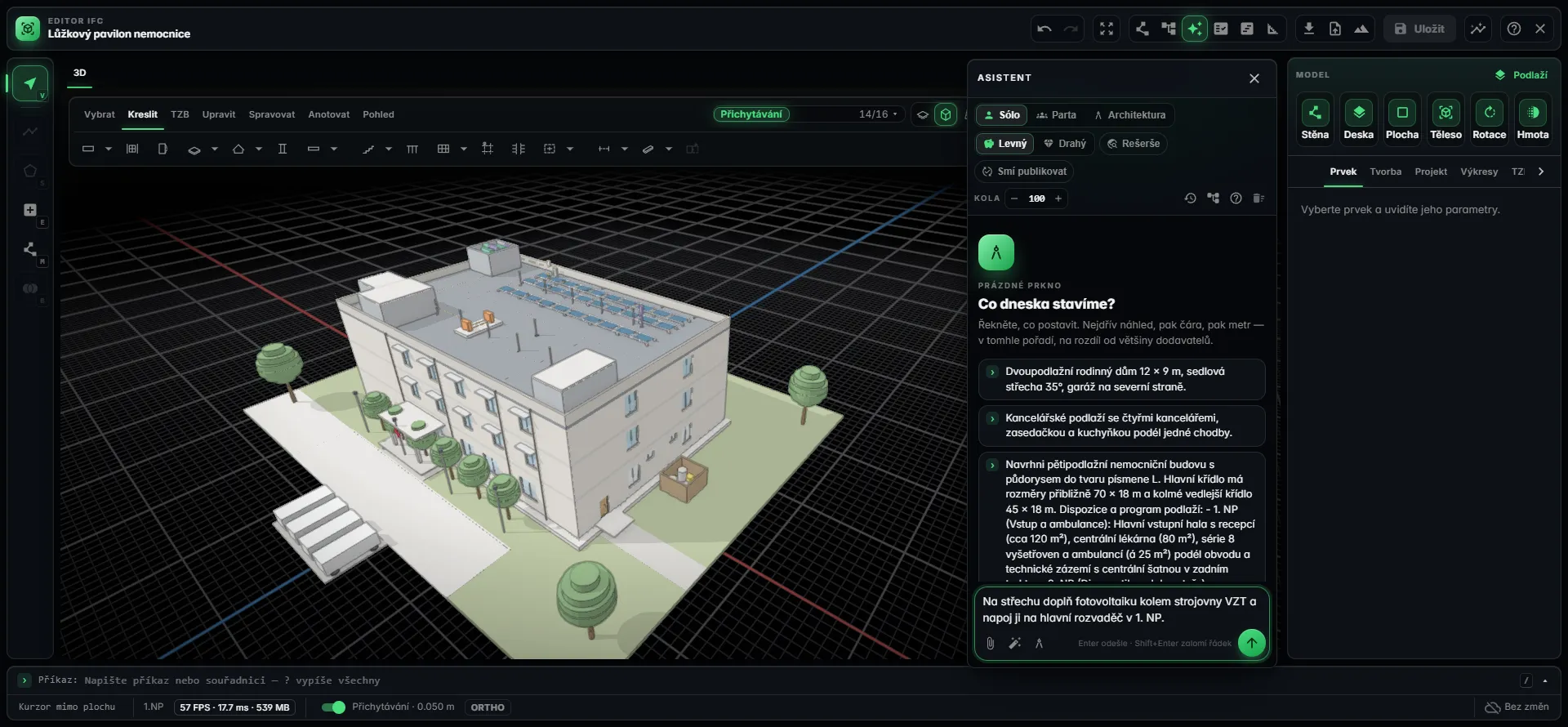
Where the Scripting API runs today
The Scripting API is in-editor scripting: you write and run scripts inside BIM Harness in the browser, against the open project. It is part of the Studio plan and up. It is not a public REST API, SDK or installable package, and this page does not promise one.
What leaves the editor is open data: IFC4X3 export at any time, drawings as PDF, DWG and DXF, quantities as XLSX or CSV. A script is how you build and change the model; IFC is how it travels to other tools.
Frequently asked questions
What is BIM scripting?
BIM scripting means creating or changing a building information model with code rather than by hand. It is used for batch edits, repeating layouts, rule-driven design and automation. In BIM Harness scripts are written in a building dialect - calls like api.wall, api.space and api.door - that a parametric kernel builds, checks and exports to IFC4X3.
Does BIM Harness have a BIM API?
Yes, as in-editor scripting. The Scripting API lets you run scripts against the open project in the browser, using the same API the AI agent builds models with. It is available on the Studio plan and up. There is no public REST API, SDK or installable package; models leave the editor as IFC4X3, drawings and schedules.
How is the dialect different from scripting a CAD API in Python?
A general API exposes entities, placements and geometry, so the script must know coordinates, hosting rules and derived values. The Harness dialect exposes building elements and relations: a door is placed in a wall by its id and an offset, a room is an IFC space, roof heights come from api.roofLevels. The kernel supplies the geometry and the checks.
What happens when a script is wrong?
Run it as a trial build first. The kernel builds and checks it without committing anything, and returns named findings such as clash.hard, door.obstructed or stair.throughFabric, split into author and engine findings. Some calls refuse outright, for example a gable not covered by its roof is reported and not built. You then fix the script with a targeted edit.
Is the output of a script deterministic?
Execution is. The same script run against the same kernel builds the same model, and MEP layout and clash resolution are handled by deterministic resolvers rather than by a language model. What a language model writes can vary from run to run; once it is a script, building it is reproducible, which makes scripts reviewable and diffable.
Can I edit a model the AI generated with my own script?
Yes. The AI agent works through the same dialect, so its model is made of the same elements your script can address. You can retype elements, add a storey or change a grid by script, edit by hand in the full browser editor, or ask the AI for the next change in a sentence. All three routes act on one parametric model.
Write buildings, not geometry
Open a model the agent scripted, download its IFC, and see what a building dialect produces. Scripting in the editor comes with the Studio plan and up.